 Synology Contact / Grandstream / multiple numbers per Contact
Added by Olaf Thyssen about 1 year ago
Hallo Jörg,
awesome work with L2CPBG and I like the docker release, especially when Synology Contacts is already used.
Architecture: Synology Docker (l2cpbg-docker.zip)
Voice phone: Grandstream WP825
CardDAV Server: Synology Contacts
(ReadMe 0100 has been read)
Usually I have either homePhone or mobile but sometimes both entries for contacts in Synology Contacts

On the Grandstream I receive always only one number for the contact and mobile wins over homePhone if both are present
Do I need to set some kind of merge LDAP attributes or mapping in the config file or is it the behavior of the Grandstream ?
Any hints how I get an alphabetical ordered LDAP address book on the Grandstream with
sn, givenName ???
"LDAP Display Name" with %cn shows the full name but not really ordered by first name.
Some manuals for some Grandstream desk phones are using gn for givenName , but it seems the WP825 neither honors gn nor givenName .
If I set
- %sn %gn
- %sn %givenName
Kind regards
Olaf
Replies (14)
RE: Synology Contact / Grandstream / multiple numbers per Contact
-
Added by Olaf Thyssen about 1 year ago
well, upgrading the Grandstream from 1.0.11. 57 (recently purchased device with firmware from 2024 ?!?!) to 1.0.11. 78 introduced the sort in the LDAP config

... and I have more than one number behind each contact.
Even the sort is happening by surname the displayname is a bit confusing with leading givenName.
Haven't found how to display "sn, givenName" in contacts on Grandstream
 RE: Synology Contact / Grandstream / multiple numbers per Contact
-
Added by Jörg Ebeling about 1 year ago
RE: Synology Contact / Grandstream / multiple numbers per Contact
-
Added by Jörg Ebeling about 1 year ago
Hi Olaf,
glad to hear that L2CPBG and the docker container is usefull for you
Having multiple phone numbers per contact, is a fully normal usecase.
But if I understand correctly, most is solved now after the firmware update?
Probably worth to test:
L2CPBG sort the LDAP response automatically based on the requested attributes.
So, if you set i.e. "LDAP Display Name = %sn %givenName", then L2CPBG will sort the result first by the surname, and equal surnames afterwards by given name.
L2CPBG does this with a "Natural string comparison" similar sort algorithm.
But yes, for this you need to find out how this get supported by Grandstream
"LDAP Display Name" sounds pretty correct and nearly all desk-phones I do know, support that, but some are limited in that way, that you can only use those field in "LDAP Display Name" which get also used within the "name filter"!
Also please keep in mind that L2CPBG's sorted results will only work as expected if the phone don't sort it again
RE: Synology Contact / Grandstream / multiple numbers per Contact
-
Added by Olaf Thyssen about 1 year ago
Hi Jörg,
the Grandstream doesn't honor your L2CPBG sort.
LDAP Name Attributes = sn givenName company cn
LDAP Display Name = %sn %givenName %company
I already played around with it, but I must explicitly set "Sort Results" to "Yes" in the phone.
It even doesn't matter if I use filters or not
LDAP Number filter = (|(telephoneNumber=%)(mobile=%)(homePhone=%))
LDAP Name filter = (|(sn=%)(givenName=%)(company=%)(cn=%))
The filters I usually don't need as I'm lazy, created dedicated phonebook in Synology Contacts
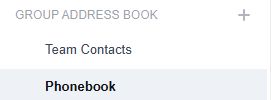
and filtering it in the config
[dav]
addressbooks = "Phonebook"
Another thing I observed is the missing number "type" behind each contact
When selecting a contact, I just see:
Number
0176xxxxxx
Number
23456
I'm expecting instead of Number something like Mobile or Home
I don't know if it is Synology Contacts or the Grandstream.
RE: Synology Contact / Grandstream / multiple numbers per Contact
-
Added by Jörg Ebeling about 1 year ago
Hi Olaf!
That sounds somehow strange.
Think we should take a deeper look into what's get requested and what gets out of L2CPBG.
Within your l2cpb.conf, please change the log level to debug:
[log]
  level       = "debug"   # (trace, debug), info, warn, error, fatal or panic
And then restart your l2cpbg.
Now, if you search for any letter, you should get an "ldapsearch" log entry, some quirky looking entries but at the end also an "ldap result" entry in L2CPBGs log.
I'm interested in a letter combination where only a handful of results remain.
The "ldapsearch" log lines should show us also what exactly your Grandstream is requesting,
RE: Synology Contact / Grandstream / multiple numbers per Contact
-
Added by Olaf Thyssen about 1 year ago
Hi Jörg,
here is the full stack when I search my family with "TH" on the phone
2025/09/13 12:30:53 stderr [INF] 10:30:53 [server] 6 records returned for search request #8: Whole Subtree (|(|(telephoneNumber=TH)(mobile=TH)(homePhone=TH))(|(cn=TH)(sn=TH)(givenName=TH)(company=TH))) @ 'dc=example,dc=com' from a.b.c.d:40950 {8c74d936}
2025/09/13 12:30:53 stderr [DBG] 10:30:53 [ card ] LdapCard '{4ee18843-6f22-4f50-ac5d-234c0958cd93 Phonebook}': card.LdapCard{Cid:card.CardId{Uid:"4ee18843-6f22-4f50-ac5d-234c0958cd93", Ou:"Phonebook"}, Attrs:card.LdapAttrs{"cn":"Lxxxxx Thyssen", "givenName":"Lxxxxx", "mobile":"xxx xxxxx", "sn":"Thyssen"}}
2025/09/13 12:30:53 stderr [DBG] 10:30:53 [ card ] LdapCard '{cdb1e53f-8370-49a1-b7ba-89c3057ecd14 Phonebook}': card.LdapCard{Cid:card.CardId{Uid:"cdb1e53f-8370-49a1-b7ba-89c3057ecd14", Ou:"Phonebook"}, Attrs:card.LdapAttrs{"cn":"C1xxxx Thyssen", "givenName":"C1xxxx", "mobile":"xxx xxxxx", "sn":"Thyssen"}}
2025/09/13 12:30:53 stderr [DBG] 10:30:53 [ card ] LdapCard '{37510f13-a305-4e6a-8d8d-22c9fe1eeca1 Phonebook}': card.LdapCard{Cid:card.CardId{Uid:"37510f13-a305-4e6a-8d8d-22c9fe1eeca1", Ou:"Phonebook"}, Attrs:card.LdapAttrs{"cn":"C2xxxx Thyssen", "givenName":"C2xxxx", "homePhone":"xxxxx", "mobile":"xxx xxxxx", "sn":"Thyssen"}}
2025/09/13 12:30:53 stderr [DBG] 10:30:53 [ card ] LdapCard '{c090434e-bbc0-484a-8479-8bfd47de8fce Phonebook}': card.LdapCard{Cid:card.CardId{Uid:"c090434e-bbc0-484a-8479-8bfd47de8fce", Ou:"Phonebook"}, Attrs:card.LdapAttrs{"cn":"Txxxxx Thyssen", "givenName":"Txxxxx", "homePhone":"xxxxx", "mobile":"xxx xxxxx", "sn":"Thyssen"}}
2025/09/13 12:30:53 stderr [DBG] 10:30:53 [ card ] LdapCard '{54ac3d61-07b1-40c6-a3ec-15f720e129b0 Phonebook}': card.LdapCard{Cid:card.CardId{Uid:"54ac3d61-07b1-40c6-a3ec-15f720e129b0", Ou:"Phonebook"}, Attrs:card.LdapAttrs{"cn":"Oxxxxx Thyssen", "givenName":"Oxxxxx", "mobile":"xxx xxxxx", "sn":"Thyssen"}}
2025/09/13 12:30:53 stderr [DBG] 10:30:53 [server] Collected CardIds map[{37510f13-a305-4e6a-8d8d-22c9fe1eeca1 Phonebook}:true {4ee18843-6f22-4f50-ac5d-234c0958cd93 Phonebook}:true {54ac3d61-07b1-40c6-a3ec-15f720e129b0 Phonebook}:true {c090434e-bbc0-484a-8479-8bfd47de8fce Phonebook}:true {cdb1e53f-8370-49a1-b7ba-89c3057ecd14 Phonebook}:true]
2025/09/13 12:30:53 stderr [DBG] 10:30:53 [server] Regexp matching key 'lsn.thyssen.cdb1e53f-8370-49a1-b7ba-89c3057ecd14'
2025/09/13 12:30:53 stderr [DBG] 10:30:53 [server] Regexp matching key 'lsn.thyssen.c090434e-bbc0-484a-8479-8bfd47de8fce'
2025/09/13 12:30:53 stderr [DBG] 10:30:53 [server] Regexp matching key 'lsn.thyssen.54ac3d61-07b1-40c6-a3ec-15f720e129b0'
2025/09/13 12:30:53 stderr [DBG] 10:30:53 [server] Regexp matching key 'lsn.thyssen.4ee18843-6f22-4f50-ac5d-234c0958cd93'
2025/09/13 12:30:53 stderr [DBG] 10:30:53 [server] Regexp matching key 'lsn.thyssen.37510f13-a305-4e6a-8d8d-22c9fe1eeca1'
2025/09/13 12:30:53 stderr [DBG] 10:30:53 [server] Regexp matching key 'lcn.txxxxx thyssen.c090434e-bbc0-484a-8479-8bfd47de8fce'
2025/09/13 12:30:53 stderr [DBG] 10:30:53 [server] Regexp matching key 'lcn.oxxxxx thyssen.54ac3d61-07b1-40c6-a3ec-15f720e129b0'
2025/09/13 12:30:53 stderr [DBG] 10:30:53 [server] Regexp matching key 'lcn.lxxxxx thyssen.4ee18843-6f22-4f50-ac5d-234c0958cd93'
2025/09/13 12:30:53 stderr [DBG] 10:30:53 [server] Regexp matching key 'lcn.c1xxxx thyssen.cdb1e53f-8370-49a1-b7ba-89c3057ecd14'
2025/09/13 12:30:53 stderr [DBG] 10:30:53 [server] Regexp matching key 'lcn.c2xxxx thyssen.37510f13-a305-4e6a-8d8d-22c9fe1eeca1'
2025/09/13 12:30:53 stderr [DBG] 10:30:53 [server] s.request.Filter '(|(|(telephoneNumber=TH)(mobile=TH)(homePhone=TH))(|(cn=TH)(sn=TH)(givenName=TH)(company=TH)))'
2025/09/13 12:30:53 stderr [DBG] 10:30:53 [server] Search(searchReq ldap.SearchRequest{BaseDN:"dc=example,dc=com", Scope:2, DerefAliases:0, SizeLimit:100, TimeLimit:4, TypesOnly:false, Filter:"(|(|(telephoneNumber=TH)(mobile=TH)(homePhone=TH))(|(cn=TH)(sn=TH)(givenName=TH)(company=TH)))", Attributes:[]string{"telephoneNumber", "homePhone", "mobile", "sn", "givenName", "company", "cn"}, Controls:[]ldap.Control{}}, ...
2025/09/13 12:30:53 stderr [DBG] 10:30:53 [server] Stats &ldap.Stats{Conns:8, Binds:8, Unbinds:7, Searches:8, statsMutex:sync.Mutex{state:0, sema:0x0}}
2025/09/13 12:30:53 stderr [INF] 10:30:53 [server] Search request #8: (|(|(telephoneNumber=TH)(mobile=TH)(homePhone=TH))(|(cn=TH)(sn=TH)(givenName=TH)(company=TH))) from a.b.c.d:40950 {8c74d936}
The result on the Grandstream with disabled sort is:
- Lxxxx x Thyssen
- C1xxxx Thyssen
- Oxxxxx Thyssen
- C2xxxx Thyssen
- Txxxxx Thyssen
RE: Synology Contact / Grandstream / multiple numbers per Contact
-
Added by Jörg Ebeling about 1 year ago
Hi Olaf,
your log is really helpful!
Let's try to clarify what happen:
If you search for "TH", your phone normally use the "LDAP Name Filter" which seem to be currently configured in your phone as (|(|(telephoneNumber=%)(mobile=%)(homePhone=%))(|(cn=%)(sn=%)(givenName=%)(company=%)))
First (and further) search attribute is the useless "telephoneNumber" which is also used for the primary search order. So I would guess if you compare the delivered L2CPBG result it, is correct sorted but by telephoneNumber.
Please change your "LDAP Name Filter" to (|(sn=*%*)(givenName=*%*)(company=*%*)(cn=*%*)).
Might be that you get an error or no result because of the "*" characters, if so please remove them.
Let's see what happen now
RE: Synology Contact / Grandstream / multiple numbers per Contact
-
Added by Olaf Thyssen about 1 year ago
Hi Jörg,
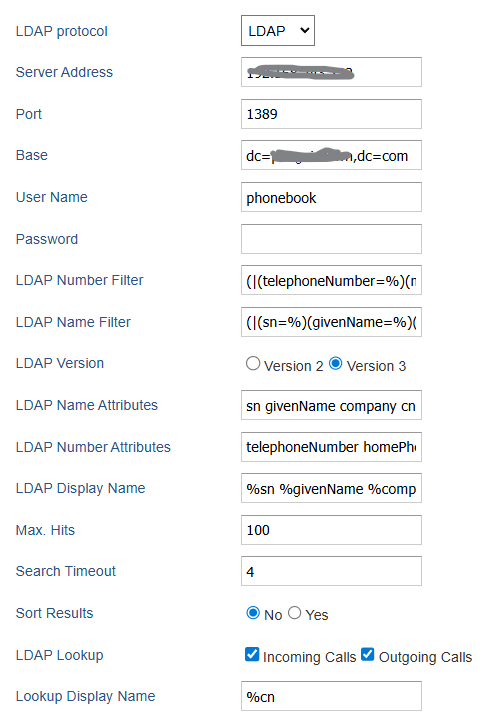
I already have the filters:
LDAP Number filter = (|(telephoneNumber=%)(mobile=%)(homePhone=%))
LDAP Name filter = (|(sn=%)(givenName=%)(company=%)(cn=%))
It seems that both filters become combined and send over
Here is my Grandstream LDAP UI
RE: Synology Contact / Grandstream / multiple numbers per Contact
-
Added by Jörg Ebeling about 1 year ago
This is §&"$%!
Looks to me that they're extra gifted to develop useless solutions
In that case: I'm sorry, but I can't help you.
RE: Synology Contact / Grandstream / multiple numbers per Contact
-
Added by Olaf Thyssen about 1 year ago
Hi Jörg,
np, I can use the sort of the phone
The Grandstream is even behaving weird in the call history.
Incoming call does a lookup correctly and showing the cn from the LDAP on the display, but as soon as I have answered the call I just see the phone number, and just the phone number is logged in the call history.
If I have the number as local contact the name and number is logged.
Same with outgoing calls.
The LDAP topic is closed for me.
Due to that I have my doubts that the Grandstream is the right phone for me.
The usability of the phonebook and search is complex.
It needs very good WiFi connection otherwise the battery won't last long.
I'm moving away from DECT as my FritzBox will be decommissioned and the Dream Machine takes over with Unifi Talk.
Does anybody have experience with Yealink AX83? Is it doing LDAP better?
https://www.yealink.com/de/product-detail/yealink-ax83h-business-wi-fi-handset
We have recently deployed some Teams Rooms device of this vendor globally (but isolated via VLANs, you never know ) and they are quite straight forward and feature rich, but I don't know if I want to let the vendor into my home.
RE: Synology Contact / Grandstream / multiple numbers per Contact
-
Added by Olaf Thyssen 11 months ago
Hi Jörg,
Update:
I purchased Yealink AX83H and this returns the contact list alphabetically even sort is disabled on the phone.
In general the Yealink is much more comfortable for end user, e.g. selecting contact from the LDAP phonebook or config settings from the Web UI for the system administrator .
Even it is much lighter than the Grandstream and close to the Fritz phones.
The only problem I still have is that for a selected contact from the phonebook on the phone with several phone numbers I don't see the label like Home, Mobile, etc
Instead I only see Number1, Number2, etc. as headers.
Something to configure in L2CPBG or something weird from Synology Contacts ?
RE: Synology Contact / Grandstream / multiple numbers per Contact
-
Added by Jörg Ebeling 11 months ago
Quite Cool!
Yeah, L2CPBG will pre-sort entries based on display attribute order, which should be the logical order.
Never used that AX83H, but guessing it has a similar firmware than the others, did you already tried this: https://projects.shbe.net/boards/4/topics/84 ?
Please drop a note when it's working, I'm interested to include that model into my compatibility list if everything is working as expected.
RE: Synology Contact / Grandstream / multiple numbers per Contact
-
Added by Olaf Thyssen 11 months ago
Awesome !
The article solved the NumberX problem.
AX83H is working perfectly, really rich device in regards to settings and usability, they will have their own VLAN later, in case of spyware
Now I can work on Unifi Talk and its disabilities in Germany and lack of features compared to FritzBox PBX, but still having the plan to give up the FritzBox and rely on DreamMachine only
If that is solved, getting more of the AX83H and coming back to acquire the license.
RE: Synology Contact / Grandstream / multiple numbers per Contact
-
Added by Jörg Ebeling 11 months ago
Quite nice that the description also worked with your AX83H. However, these flowers need to go to Yealink because they do build such unified firmware for their phones!
Oh, another guy with bad experience with Unifi ... I also will not try them again ... but... FritzBox is not a PBX ... "yes", you can make telephone calls with it, but it's not a PBX (in terms of what a PBX is normally capable to do). No BLF (Busy Lamp Field) support, routing and forwarding is only generic, no provisioning, ... Did you ever tried Yeastar? Even the small Yeastar S20 is a full blown Asterisk but with a pretty good GUI and without money bagging like FreePBX or the like. Buy once and get updates for years.
However... could be that the S20 is obsolete in the meantime and they probably made a newer one.
Wish you success in migrating
RE: Synology Contact / Grandstream / multiple numbers per Contact
-
Added by Olaf Thyssen 11 months ago
Mate, I know that FritzBox is not a PBX , but this is the only "function" the device is left with offering to my family.
I played with FreePBX on Raspberry or in Synology Docker to replace the FritzBox but another standalone solution while the UI of AVM is unbeatable and concentrates on the simple things.
As my DreamMachine is the central place, I still give it a chance to handle the phones ...
Thanks for your support.